Create Backup Cinder
This type of backup is directly related to Cinder volumes.
It is possible to create a backup of an existing volume when it is in state 'available' or 'in use' (passing the --force flag)
If one virtual machine have a volumen attached is possible create a backup.
These volumes are stored in Ceph.
- Using CLI
- Using UI
Create Backup using CLI
note
Version of OpenStack client used: 5.8.0 for the CLI
Volume Identifier
List the available volumes and identify the volume ID:
openstack volume list
+--------------------------------------+---------------------------------+-----------+------+----------------------------------------------------------------+
| ID                                   | Name                            | Status    | Size | Attached to                                                    |
+--------------------------------------+---------------------------------+-----------+------+----------------------------------------------------------------+
| eccce6f3-abf9-459f-8da4-9441536dab71 |                                 | in-use    |   16 | Attached to Recovery-intance on /dev/vda                       |
+--------------------------------------+---------------------------------+-----------+------+----------------------------------------------------------------+
Create the Backup
warning
Never include text in Container Name, only Name and Description
openstack volume backup create \
  --force \
  --name backup-test-$(date +%Y%m%d) \
  eccce6f3-abf9-459f-8da4-9441536dab71

+-----------+--------------------------------------+
| Field     | Value                                |
+-----------+--------------------------------------+
| id        | 7465fe2a-cf8e-4e32-9d62-2571601288cd |
| name      | backup-test-20260121                 |
| volume_id | eccce6f3-abf9-459f-8da4-9441536dab71 |
+-----------+--------------------------------------+
Check the status is available
openstack volume backup show 7465fe2a-cf8e-4e32-9d62-2571601288cd

+-----------------------+--------------------------------------+
| Field                 | Value                                |
+-----------------------+--------------------------------------+
| availability_zone     | None                                 |
| container             | cinder-backup                        |
| created_at            | 2026-01-21T09:27:18.000000           |
| data_timestamp        | 2026-01-21T09:27:18.000000           |
| description           | None                                 |
| encryption_key_id     | None                                 |
| fail_reason           | None                                 |
| has_dependent_backups | False                                |
| id                    | 7465fe2a-cf8e-4e32-9d62-2571601288cd |
| is_incremental        | False                                |
| metadata              | {}                                   |
| name                  | backup-test-20260121                 |
| object_count          | 0                                    |
| project_id            | None                                 |
| size                  | 16                                   |
| snapshot_id           | None                                 |
| status                | available                            |
| updated_at            | 2026-01-21T09:46:04.000000           |
| user_id               | None                                 |
| volume_id             | eccce6f3-abf9-459f-8da4-9441536dab71 |
+-----------------------+--------------------------------------+
Create Backup using UI
- Volume Identifier
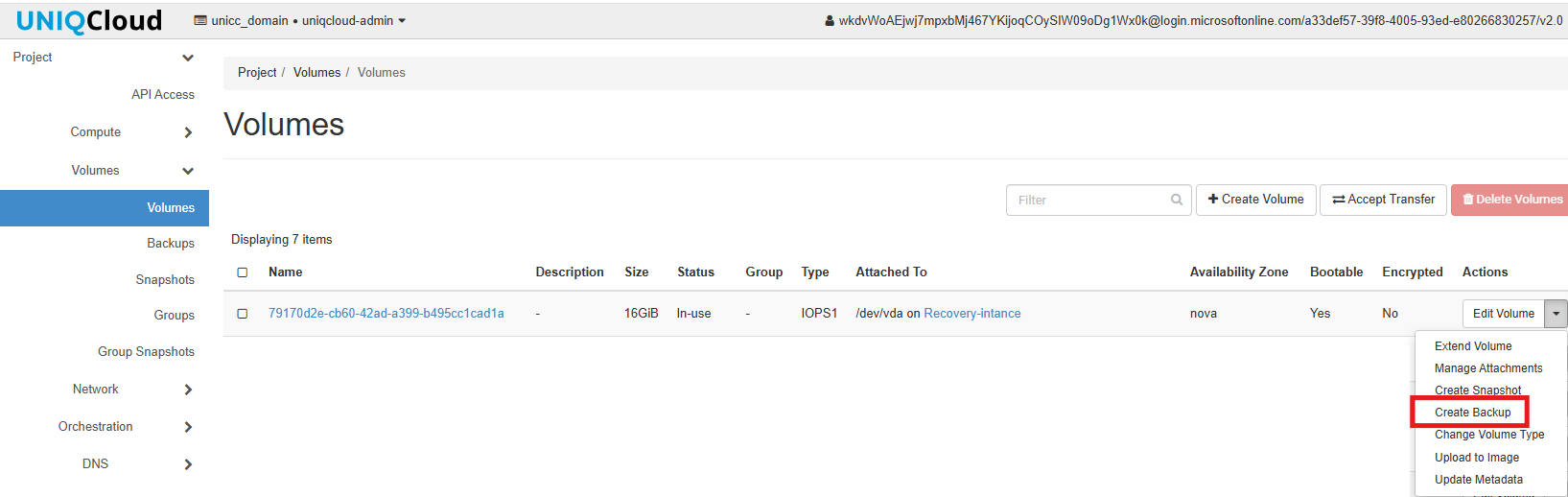
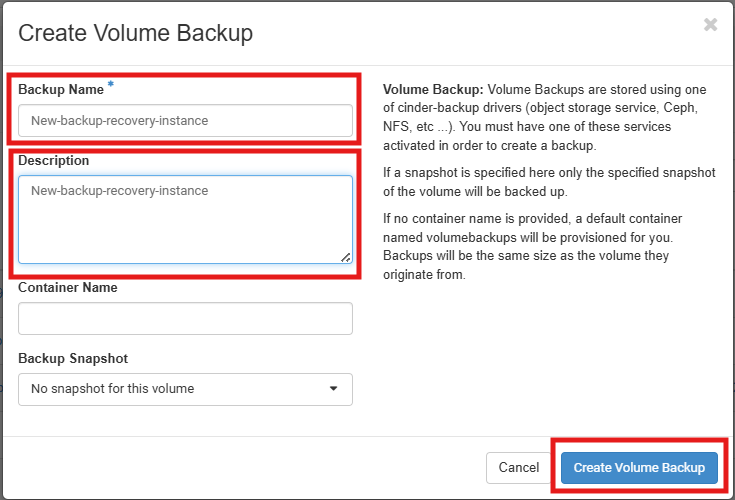
- Select Create Volume Backup
warning
Never include text in Container Name, only Name and Description
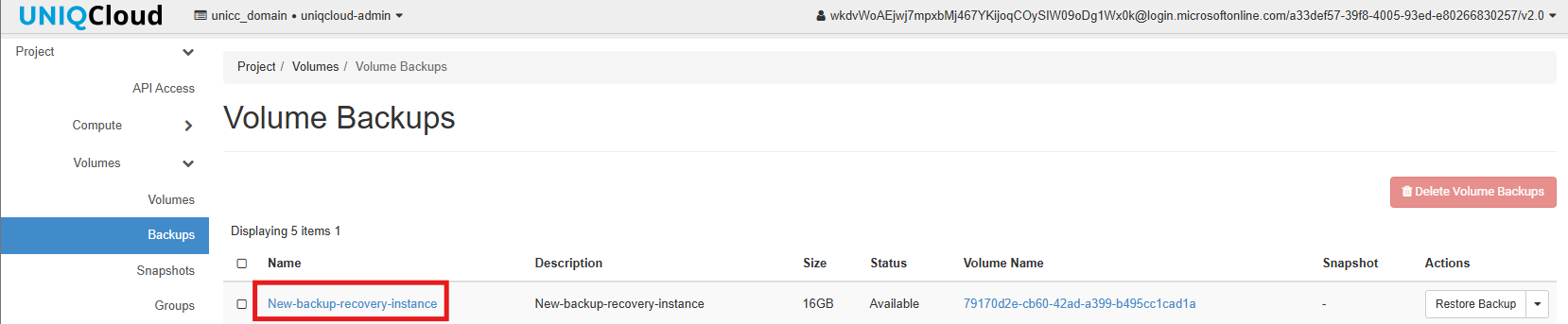
- Check the status is available