Backup Targets
Backup Targets
Trilio workloads can be stored in two different backup targets: one inside the UNIQCloud region in Valencia, and an external one in Geneva. The target is selected in the Backup Target Types field of the Details tab when you create a workload.
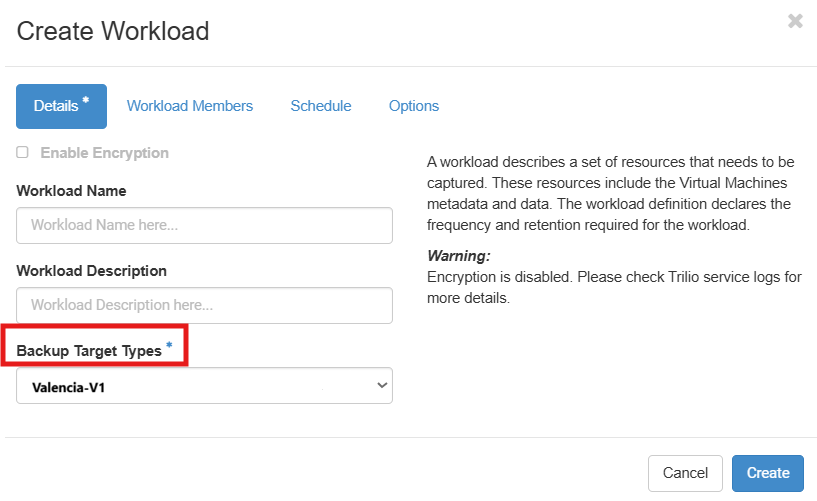
Available targets
| Target | Location | Type | Latency |
|---|---|---|---|
| valencia-v1 | Valencia (eu-vlc), the same region where your instances run | Local backup (default) | Lowest |
| geneva-v1 | Geneva | External backup (off-site copy) | Higher |
valencia-v1 — local backup
Backups are written to the object storage located in the same region as your workloads. Because the data never leaves the region, snapshots and restores complete faster.
Use it for:
- Day-to-day scheduled backups.
- Workloads where restore time is the priority.
- Large workloads that generate a big volume of data on every snapshot.
geneva-v1 — external backup
Selecting geneva-v1 stores the backup in the external backup site, keeping a copy of your data outside the Valencia region. This protects your workloads against a site-level incident affecting the primary region.
Use it for:
- Disaster recovery requirements.
- Geographic redundancy of critical workloads.
- Data that must be kept in a separate location for compliance reasons.
The external backup is reached over the inter-site link, so geneva-v1 has higher latency than valencia-v1. Expect snapshots and restores to take longer, especially for the first (full) snapshot of a workload. Take this into account when defining the schedule and the retention policy of the workload.
Choosing a target
- Choose valencia-v1 if you want the fastest backups and restores, and your data does not need to be stored outside the region.
- Choose geneva-v1 (external backup) if the workload requires an off-site copy, accepting the additional latency.
- If you need both, create two workloads over the same instances, one per backup target.
The backup target is selected when the workload is created. See Creating a New Backup Workload for the rest of the workload options.